Written by Sean Ludwig
Ready to jump into Twitter, but don’t know how to get started? Follow these 10 tips and you’ll fit right in.
Is it finally time to take the Twitter plunge? The free service that lets users micro-blog 140 characters at a time had accumulated around 1.9 million users as of December 2008, according to comScore. If you are just now jumping on the Twitter bandwagon, or are intimidated by your inexperience with Twitter etiquette and acronyms, allow us to share some Twittery tips that will make your experience easier and more enjoyable.
1. Shrink Your URLs

One of the most common uses of Twitter is sharing links. But you only have 140 characters to work with, so instead of sharing a long URL, use one of several URL-shortening services to shrink that link. Some of our favorites include tinyurl.com, is.gd, ow.ly, and bit.ly.
2. RT = Retweet
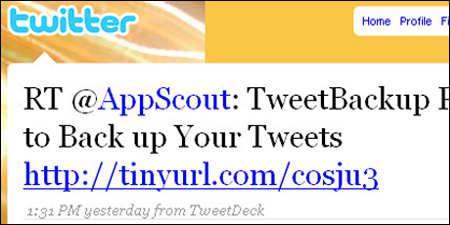
If you want to copy and paste someone else’s tweet, that’s totally accepted and appreciated, as long as you give the original tweeter credit for it. Just put “RT @name” in front of their tweet and post it yourself.
3. Direct Messaging
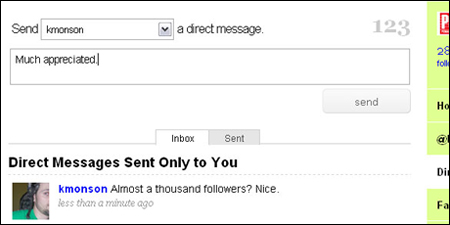
With Twitter’s direct-messaging (DM) function, you can send a private 140-character message to another user, kind of like abbreviated e-mail. However, you can only direct message Twitter users that are following you.
4. Use the @ Sign

To create a reply or to give someone props on Twitter, simply place an @ sign in front of their Twitter name. If it is a reply, the @ sign must be the first character of the tweet. To see replies to your own tweets, click on @Replies from your profile page.
5. Search For Your Friends

Search.twitter.com works well for finding your friends, celebrities, or organizations, or for searching for specific topics you’re interested in.
-next: Twitter Tips 6-10 >
6. Categorize Your Tweets for Added Visibility
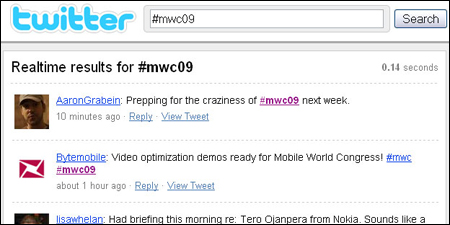
If you’re tweeting about a popular subject (Obama, Lost, etc) putting a # in front of the subject makes it easy for others to find your tweet, and perhaps they will want to follow you. For example, when the plane crashed into the Hudson River in January, #flight1549 became a popular tag and search term.
7. Share Pictures

People love sharing their photos with the world, and some even break news with them, like Janis Krums, who used TwitPic to post one of the first up-close photos of Flight 1549 on his Twitter feed. Services like TwitPic let users easily upload their photos and post them directly to Twitter.
8. Tweet from Your Phone
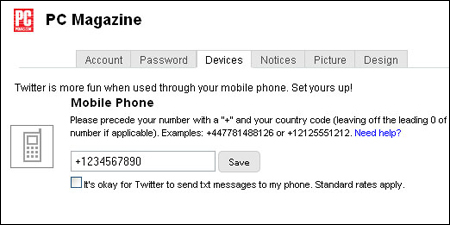
Twitter allows you to update your status and receive updates via text message. Under Settings, go to the Devices tab and enter your phone number to start sending and receiving mobile tweets. If your incoming tweets/texts are overwhelming you, disable this option by going back to the same panel and following the instructions.
9. Pick a Good Desktop Client
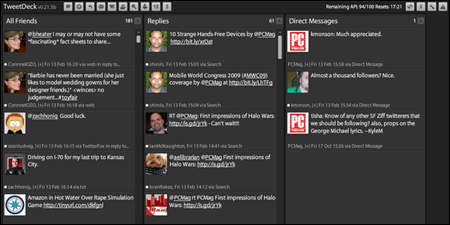
With desktop clients such as TweetDeck, Twhirl, and TwitterFox, you can receive tweets in a much more manageable fashion, especially if you follow a lot of people, respond often, and use direct messages a lot. TweetDeck, for example, allows you to create specific groups, if you want to split your feed into individual columns.
10. Download a Mobile Client

If you have a BlackBerry, an iPhone, or another smartphone with Wi-Fi or 3G access, a mobile client might be a better option than using text messages. Mobile Twitter clients worth checking out include Twitterific, TwitterBerry, PocketTweets, and Twidroid.
IN NEW YORK CITY theres a hot new play on the horizon
“TWEETER THEATER” bY Award winning Playwright LARRY MYERS
It captures the frenzy of connecting that is tweeting
Really useful intro to Twitter and its lingo
great post. very nicely explained. I will add to my twitter bookmarks on delicious 🙂
Many professionals are turning to Twitter.
http://betterdot.wordpress.com/2009/04/26/10-twitter-tips-for-professionals/
Great post Sean, enjoyed reading your tips.
See our website @ http://tweeterland.com. It’s dedicated to everything twitter and aims to give twitters users the information they need to use and make the most of twitter.
Keep up the great posts.
Tweeterland
http://tweeterland.com
Nice article, definitely worth reading.
Just want to add another service which works great; http://tweetsourcer.com
Happy tweeting!
Great beginners article. Its nice to see a combination of words and images.
Great tips for beginners, nice work. For lazy twitters I would recommend feald tools http://feald.com/index/tools
I created a free tutorial on how to schedule future Tweets wishing your friends/followers a Happy Birthday. It’s a great way to stay connected, even if you have limited time to do so:
http://www.youtube.com/watch?v=CcjHlySkqEs
Tweet regularly to get more followers.
It’s better to tweet on a particular subject from any particular twitter account instead of tweeting on random subject. You can create a separate account for each subject, if required.
Wonderful Post Sean! I couldn’t come up with better tips myself. But I would like to add 1 more “be transparent, passionate, and just tell your story and others will either accept it or not”.
Thanks Again…
Michelle
I hope I will get a lot more visitors over twitter now. Great tips.